

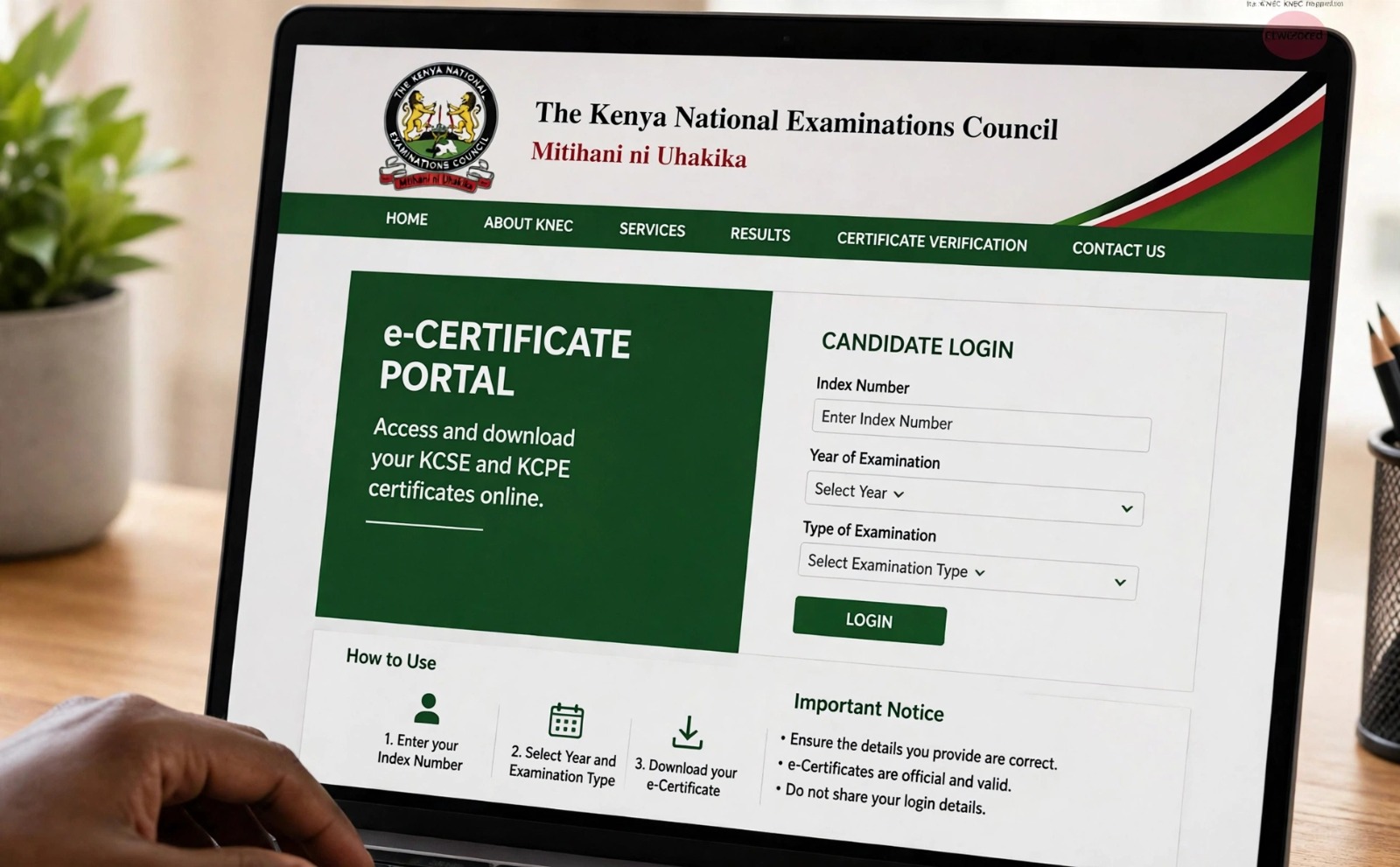
- KNEC now allows KCSE candidates from 1989 to date to generate and download e-Certificates for KSh1,500 after verification
- One must register, complete a profile, enter the index number, year and exam type, pay via M-Pesa and download the PDF.
- Employers and institutions must register as verifiers for approval, then submit candidate details for verification.
Kenya National Examinations Council (KNEC) has moved the process of accessing and verifying KCSE certificates further into the digital space, allowing eligible former candidates to generate and download an electronic certificate online instead of relying solely on physical documents and manual applications.
The KNEC e-Certificate platform enables candidates to obtain their KCSE certificates digitally, while employers, universities and other authorised institutions can use the system to verify the credentials presented by applicants.
For former KCSE candidates, the process involves registering on the portal, confirming an email address through a one-time password (OTP), providing examination details and paying the applicable KSh1,500 fee. The service is currently designed for KCSE candidates whose examination records fall within the years supported by the platform, with KNEC indicating that other examination certificates will be incorporated in later phases.
Where to access the KNEC e-Certificate service
Applicants should use KNEC’s official channels when accessing the service. The e-Certificate portal is: https://ecertificate.knec.ac.ke/. Users can also access the service through the e-Certificate section of the official KNEC website. Applicants should be particularly careful when making payments or submitting personal information online. They should avoid links supplied through unofficial websites, social-media posts or messages from unknown individuals.
ALSO READ:
Moi University reopens graduation doors for students with missing marks
How to download a KCSE e-Certificate
- Register on the portal
First-time users are required to create an account. Select the applicant or student/alumni account option and provide the information requested by KNEC. The registration process includes email verification. An OTP is sent to the email address provided by the applicant and must be entered to complete the registration. Former candidates should therefore use an email account they can access immediately.
- Complete your profile
After registration, the applicant is required to complete the personal information requested on the platform. This may include details such as full name, citizenship status, date of birth, telephone number and national identification details where applicable. The information should correspond with the candidate’s examination records. Where names or other personal details have changed since the candidate sat KCSE, the applicant may have to follow the relevant KNEC procedures for correcting or reconciling examination records.
- Enter your KCSE examination details
The applicant then proceeds to the certificate-generation section. The key examination details include KCSE index number, examination type and examination year. The information is checked against KNEC’s examination records. An incorrect index number or examination year can therefore prevent the system from matching the candidate’s records.
- Pay the applicable fee
Once the examination details have been successfully matched, the applicant proceeds to payment. The stated charge for generating a KCSE e-Certificate is KSh1,500. Payment instructions are provided through the official portal, with M-Pesa among the payment options available to applicants. Candidates should only make payment through the payment process presented on the official KNEC platform.
- Download the certificate
Once the payment and certificate-generation process has been completed, the electronic certificate becomes available for download. The applicant can then save the certificate as a PDF on a phone, computer or other secure device. It is advisable to maintain more than one secure copy, for example, on cloud storage and another personal storage device. This is particularly important because the electronic certificate can subsequently be used when a prospective employer or institution requests verification.
ALSO READ: TSC moves to equip teachers with AI skills, overhaul appraisal system
How employers and institutions verify a KCSE certificate
Obtaining an e-Certificate is only one part of the digital system. KNEC has also provided a verification mechanism through which organisations can establish whether a certificate presented by a candidate corresponds with examination records held by the Council. This is particularly relevant to employers, universities and colleges, government institutions and other authorised organisations.
Organisation registration: An organisation seeking to verify certificates must create a verifier account through the KNEC e-Certificate platform. The organisation provides the information requested during registration and verifies its email address using an OTP. The account may then enter a pending approval stage while KNEC reviews the organisation’s details and supporting documentation. Once approved, the organisation can access the verification function.
How an organisation submits a verification request
After logging into its verifier account, an authorised organisation can create a new verification request. The candidate’s details are entered, including KCSE index number, examination type, examination year and candidate’s name. The candidate’s e-Certificate may also be uploaded as part of the verification request. Organisations handling several candidates can submit multiple verification requests, making the system useful for recruitment, admissions and other processes involving large numbers of applicants. The organisation also provides the purpose of the verification and accepts the relevant consent requirements before submitting the request.
What happens after verification?
The verification results provide an indication of whether the certificate can be confirmed against KNEC records. A result may indicate that the certificate is Genuine or may be Referred to KNEC for further review. Importantly, a referral to KNEC should not automatically be interpreted as proof that a candidate has presented a forged certificate. It means the certificate could not be conclusively confirmed through the automated process and requires further examination by KNEC. Employers and institutions should therefore allow the Council to complete the verification process before reaching conclusions about an applicant’s academic credentials.
Candidates can also initiate verification: The system is not limited to employers. A candidate can also initiate the process of having an e-Certificate verified for a prospective employer or another institution. The applicant logs into the account, selects the appropriate verification option, provides the required examination information and identifies the organisation that should receive the verification report. Where applicable, the candidate provides the required consent and pays the relevant processing charge. The verification report is then transmitted through the KNEC system to the intended recipient. This provides an alternative to simply sending an electronic copy of a certificate and asking an employer to determine whether it is genuine.
Why the digital certificate matters
The move to electronic certification addresses several longstanding challenges associated with physical examination certificates. Certificates can be lost, damaged or destroyed. Candidates who have moved away from their former schools or examination centres may also find manual retrieval processes inconvenient. A digital certificate provides another way for a candidate to retain access to the credential.
The verification component is equally important. Academic qualifications are frequently required during recruitment, admission, professional registration and other formal processes. A verification system gives authorised institutions a mechanism for checking credentials against the examination authority’s records. The system therefore combines digital access with institutional verification rather than simply replacing a paper certificate with a PDF.
What candidates should do before applying
Applicants can avoid unnecessary delays by ensuring that their details are accurate before beginning the process. Have your KCSE index number and examination year available. Use an active email address, as the platform uses email-based OTP authentication. Keep your phone nearby where M-Pesa is used for payment. Ensure names and other identifying details correspond with examination records. Once downloaded, save the PDF securely and avoid relying on a single copy stored on a phone that could be lost or damaged. Always confirm that you are using the official KNEC portal before entering personal information or making payment.
Frequently asked questions
How much does a KCSE e-Certificate cost? The stated fee is KSh1,500 per KCSE e-Certificate.
Can I access my certificate online if I sat KCSE many years ago? The current e-Certificate system covers KCSE examination records within the period supported by KNEC’s digital platform, from 1989 to the present. Candidates whose records fall outside the supported period should contact KNEC for guidance.
What happens if I enter the wrong index number? The system may fail to match the information with KNEC’s examination records. Applicants should check their index number and examination year before submitting the request.
Can an employer verify a certificate? Yes. An eligible employer or other authorised organisation can register as a verifier and submit a verification request through the KNEC system.
What does “Referred to KNEC” mean? It means the certificate could not be conclusively confirmed through the available verification process and requires further review by KNEC. It should not automatically be treated as a finding of fraud.
Can a candidate send a verification report to an employer? The platform provides an applicant-initiated verification process through which a candidate can request that a verification report be sent to an employer or other institution, subject to the applicable requirements and fees.
Will KCPE and TVET certificates also be available online? KNEC has indicated that additional examination certificates are expected to be incorporated into the digital certification system in later phases.
ALSO READ: New Bill seeks to deregister teachers over sexual exploitation of learners
A new way of handling academic credentials
The KNEC e-Certificate platform changes the way former KCSE candidates can access their examination credentials and how organisations can authenticate them. For a candidate, the process is essentially digital: register, verify your email, complete your profile, provide your KCSE details, make the required payment and download the certificate. For an employer or institution, the process begins with organisation registration and approval, followed by submission of candidate details and the verification request.
The larger significance is that certification and verification are increasingly being handled through the same digital ecosystem. For former candidates, the immediate priority is to use the official KNEC platform, ensure that examination details are accurate and keep the downloaded certificate securely. For employers and institutions, the verification system provides a formal channel for checking academic credentials instead of relying solely on the appearance of a certificate supplied by an applicant.
The official starting point is the KNEC e-Certificate portal: https://ecertificate.knec.ac.ke/.
By Hillary Muhalya
Get more stories from our website: Education News
To write to us or offer feedback, you can reach us at: editor@educationnews.co.ke
You can also follow our social media pages on Twitter: Education News KE and Facebook: Education News Newspaper for timely updates.
>> Click here to stay up-to-date with trending regional stories